

One scope, specific locations
Suppose an external storage system reports sheet stock in two racks. A configured source and scope identify the external query. Article mappings connect each external article, location and unit to an existing Odoo product, an existing internal location and the product’s stock unit. The location on a mapping is specific: it does not select an entire warehouse or automatically include other locations. For one product, the mappings can distinguish two positions:
The integration service is configured to query the intended external scope and send the matching location references. A UNS Manager creates the corresponding Odoo mappings. The scope identifies that query; it is not an Odoo warehouse selector. Odoo distinguishes warehouses from their locations in its inventory documentation.
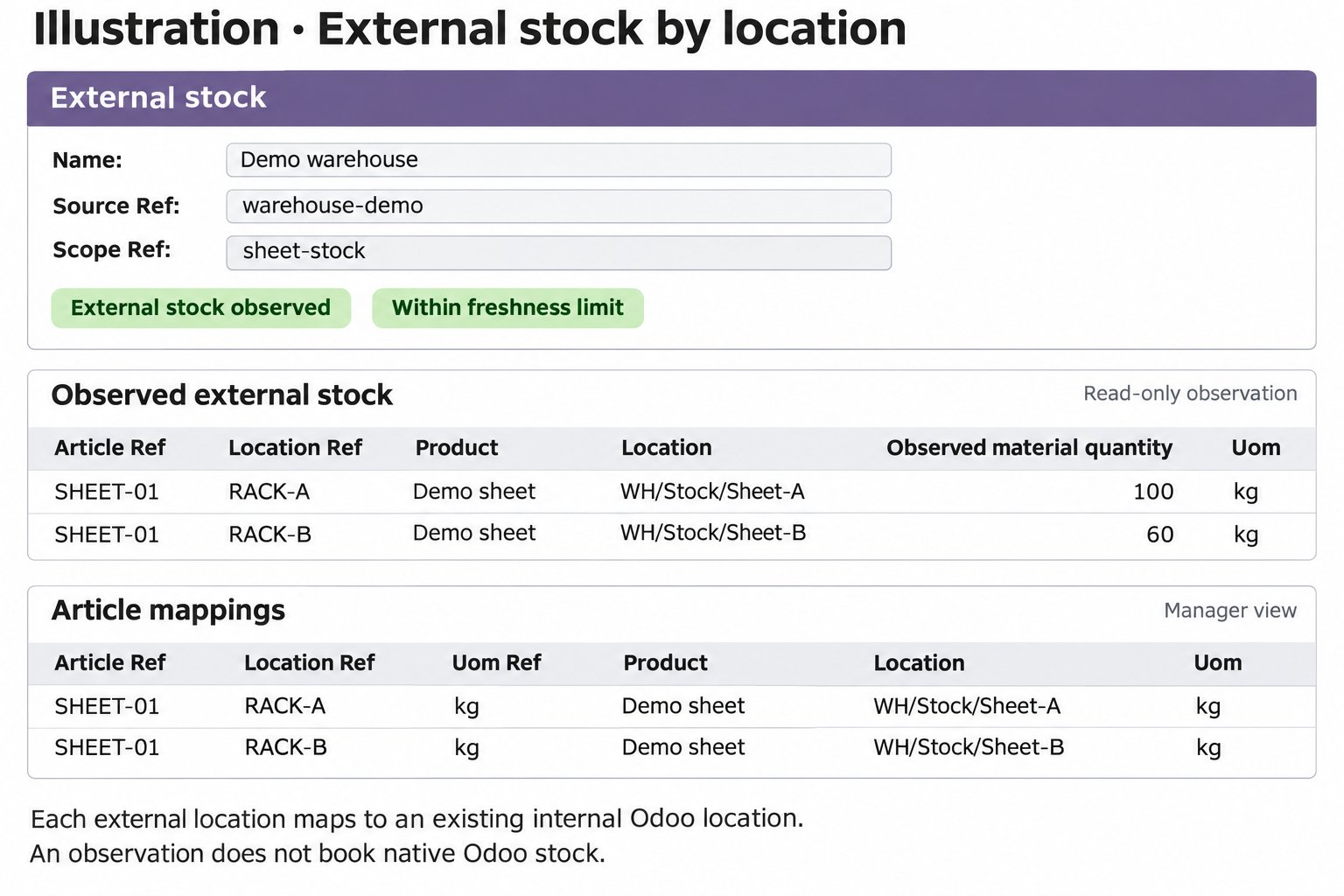
Illustration with demo data: external positions and manager-only article mappings.
Read the external position
1
Open the source
Open UNS → External stock and select the relevant source. Its company and scope identify which external read the page describes.
2
Inspect the observation
Under Observed external stock, check the mapped product, location and observed quantity. Read history shows previous reads. The latest successful read time tells when the connector last received a successful result; an external source timestamp can be absent.
3
Compare with Odoo stock
Compare the external position with Native lot stock where lot mappings are configured. Native stock and reservations are Odoo records. A difference needs investigation under the agreed process; the observation itself does not book a correction.
- External observation
- Odoo stock
The source reports what it read for the configured scope. An observation does not change Odoo inventory.
Configure the mapping
Source configuration and mappings are for a UNS Manager or administrator. A UNS User can read the information; the integration role submits the messages.
1
Define the external source and scope
In UNS → External stock, create a source with its company, source reference and scope reference. Together they identify the configured query scope for that company. The integration service must use the matching source and scope.
2
Map each external position
Under Article mappings, map the external article, location and unit to an existing product, internal Odoo location and its stock unit. The connector does not convert units. An unmapped article, location or unit causes the read to be rejected rather than guessed.
3
Add lot mappings when native booking is needed
Native lot mappings link an external lot to an existing lot of the mapped, lot-tracked product. Native stock booking is a separate authority on the source; observation does not enable it. An article mapping cannot be reassigned after it has an observed position or a lot mapping. The mapping lists do not offer deletion.
Enabling Authorize native stock booking authorizes the source for initial stock, stock corrections, internal transfers and production material consumption together. It is not a separate switch for each action or location. Mappings, any additional authority and Odoo business checks still apply.